

In Today’s world, Smartphone Security is very important for us. Our smartphones have become much more than just devices for making calls or sending messages. We use them to store personal photos, manage bank accounts, make online purchases, track health data, and even control smart home systems.
If you’ve ever worried about your privacy or thought, “What if my phone gets hacked or stolen?”, this guide will walk you through practical steps on how to secure your smartphone and keep your digital life safe.
In today’s Artificial Intelligence world mobile is a like a part of our life and we cant imagine without a Smartphone . and its privacy and security is also very important for our data. So today i give you 9 tips for your smartphone security in 2026 for protect your data and privacy like a pro.
Table of Contents
9 Best Tips for Smartphone Security.
1-Use Strong Lock Screen Security:
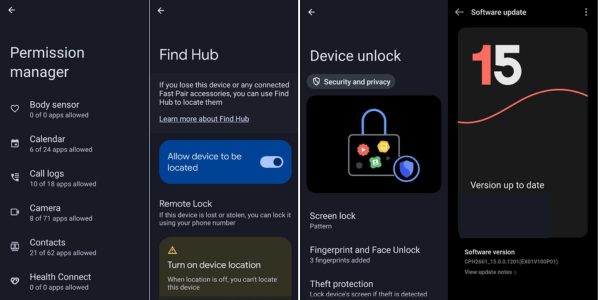
In our smartphone there are many ways to lock screen security like PIN, pattern Password ,Face Authentication, but many of us choose pin like 1234, 0000 . this is not a good way for choose pin but for the security of your smartphones a pin should be strong and random number. if you choose pattern then it is more secure then pin because its unique and least breakable so use strong pattern.
- Change your password regularly
- Use Strong pin (random number)
2-Keep Your Software Updated
Many of us not update our smartphones software update because of myth that after software update a mobile will become slow or hang. But that is not true always, Software update brings security update they give us new features and most important update contains security patches that fix known vulnerabilities hackers love to exploit. and also increase our smartphone security.
- Enable Automatic updates
- Check regularly for software updates
- Security update is Essential
3-Download App From Trusted Sources
Most of people use Android smartphones and many time they install software via untrusted site or APK files. This gives hackers to open playground to hack our mobiles. and also red signal for our smartphone security
- Only download apps from official sources like Google Play Store or Apple’s App Store.
- Always check reviews, ratings, and the developer’s credibility before installing.
- Be cautious with third-party app stores, no matter how tempting the offers look.
4-Always Use Repair Mode In Mobile When Give For Repairing
Mobile is a Electronic devices and its vulnerable from water, broken screen and now a days we face a problem like green line issue and therefor we give our mobile to service centers but always remember they access our mobile and use our photos videos and other details for anything use and in past many incident happen. so remember this steps
- Always use reapair mode
- If it is not viable then back up your data and factory reset your mobile and give to service centers.
- Always give your smartphone to authorised service centres.
Read “Apple event 2025-launch of iPhone 17 series”
5-Enable Find My Mobile Features
Losing your phone is stressful because we are not just lost our smart phones but also our privacy, data and other password and etc so enable your find my mobile features. in modern smart phones this facility comes inbuilt and that can also use for lock your device.
- On iPhones, activate Find My iPhone in iCloud settings.
- On Android devices, use Google’s Find My Device service.
- If stolen, you can remotely wipe the data to prevent misuse.
6-Use Two Factor Authentication
For apps that contain sensitive data, like your email, banking, or cloud storage, enable two-factor authentication (2FA). It adds an extra layer of security beyond just your password. and also increase our smartphone security
- 2FA usually involves a code sent to your phone or generated by an authentication app.
- Even if someone guesses or steals your password, they can’t log in without this second step.
Yes, it’s a little extra effort, but it seriously strengthens your defenses against hackers.
7-Be Careful With Public Wi-Fi

Every body loves free Wi Fi especially when your your data plan is limited . And We are always use public Wi Fi in public places, cafes , restaurant and other areas but it also one of the riskiest ways hacker can snoop your activities.
- Avoid logging into banking apps or shopping sites when on free Wi-Fi.
- If possible, stick to mobile data for sensitive tasks.
8-Backup your data Regularly
Even with all smartphone securities in the world thins can go wrong so always backup your data .
- Use cloud services like Google Drive or iCloud to automatically save photos and files.
- Keep an additional offline backup on an external hard drive or computer.
- Schedule regular backups so it becomes a habit.
This way, even in the worst-case scenario, your data stays safe and recoverable.
9-Manage App Permissions
Have you ever noticed that some apps ask for permissions that don’t make sense? A simple flashlight app shouldn’t need access to your camera, location, and contacts. This is a red flag for our smartphone security.
- Review app permissions in your phone settings.
- Uninstall apps you no longer use.
- Revoke access for apps that don’t actually need certain features
Read Samsung galaxy event 2025
Conclusion
Securing your smartphone doesn’t mean you need to become a tech expert—it’s about making smart, consistent choices with how you use your device. By using strong lock screen protection, staying updated, managing apps wisely, and being careful with networks, you turn your smartphone into a fortress rather than an easy target.
Your phone is not just another gadget—it’s a personal vault of your identity, relationships, and digital life. Protect it as much as you would protect your wallet, home, or any priceless possession. A little vigilance today can save you from major trouble tomorrow.
For more regular update and new information kindly follow me on my social media.
This information is very useful to me
Very useful
Good information